
For project managers
The plan was perfect on Monday. Then Tuesday happened.
Nexus shows what moves when a date slips, who has room to pick up the work, and whether the scope you're delivering is still the scope you signed.
Gantt, Kanban, Scrum or a mix, chosen project by project.
You build the plan three times. Nobody reads two of them.
As a project manager I spent hours building the pieces a project needs to be run properly. They got reviewed at kickoff and never opened again, because they lived in a spreadsheet or another app and nothing pulled them back into the project. And I was tired of typing the same information into three places so it could be tracked here, reported there and found somewhere else.
- The schedule lives in the project tool.
- The risk log lives in a spreadsheet.
- The scope lives in a document on a shared drive.
- The status report gets rebuilt by hand every Friday.
Every copy is a chance to be wrong, and every rebuild is a morning you didn't spend running the project.
Enter it once. It shows up everywhere it belongs.
Risks and issues raised on a task roll up to the project and its program. The charter assembles itself from the project's own sections and stakeholder register. The contract, the staffing and the rates sit on the same record as the plan.
Your week, in Nexus
- 01
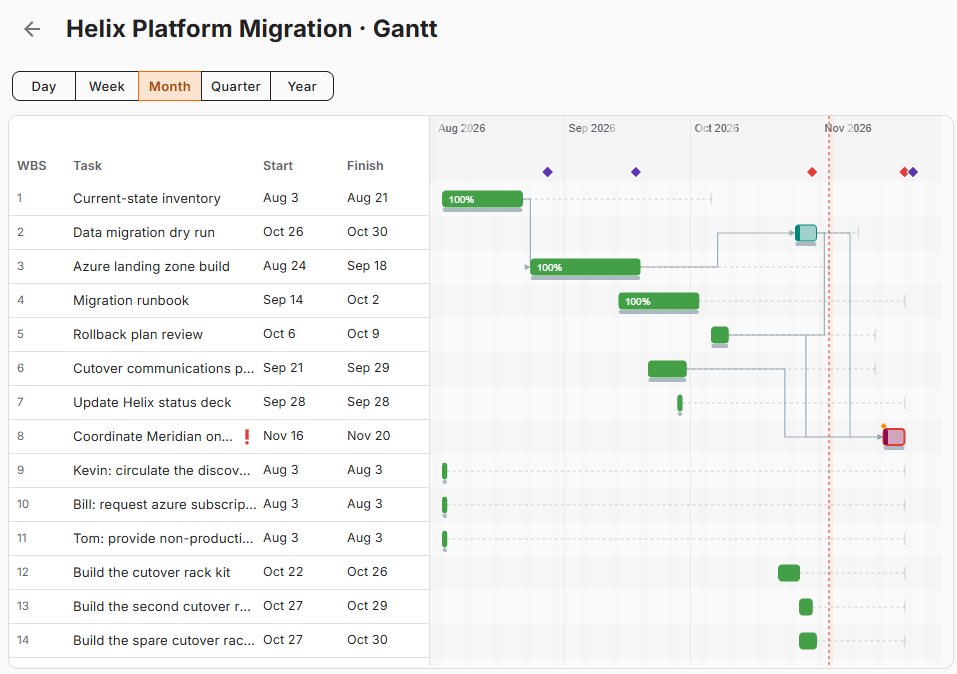
Know what moves before the client asks.
Dates come from durations and dependencies, so a slipped task moves everything that depends on it. Turn on the critical path to see which tasks decide your finish date, and compare against a saved baseline on Enterprise.
- 02
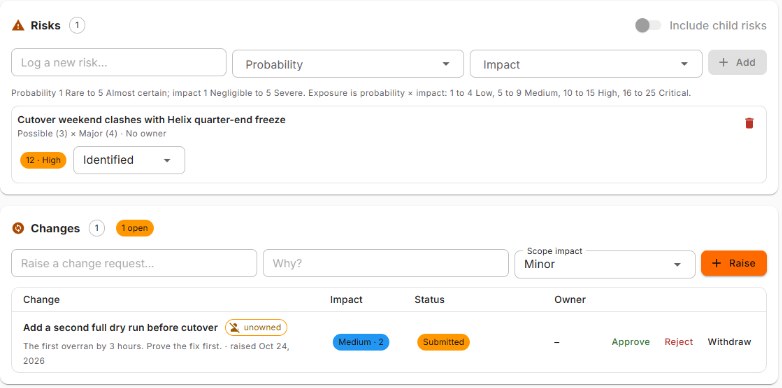
Say yes to the change, on the record.
Scope changes go in a change register with their scope impact, an owner and an approval step, next to the risks and issues they touch. With the Contract Suite, the SOW the project runs under is one click away.
- 03
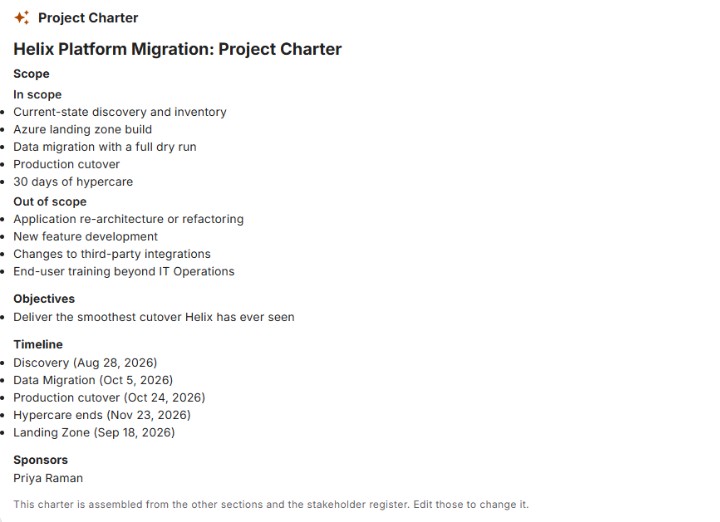
Build the charter once.
Vision, scope, timeline, budget and stakeholders each live in their own section, approved one at a time. The charter assembles itself from those sections, so the document and the project never disagree.
- 04
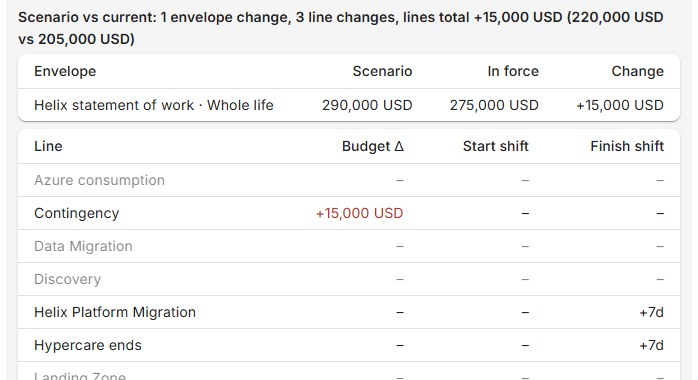
Test the slip before you commit to it.
On Pro, copy budgets and timelines into a draft scenario, see what moves and what it costs, then apply it or throw it away. The live plan doesn't change until you say so.
- 05
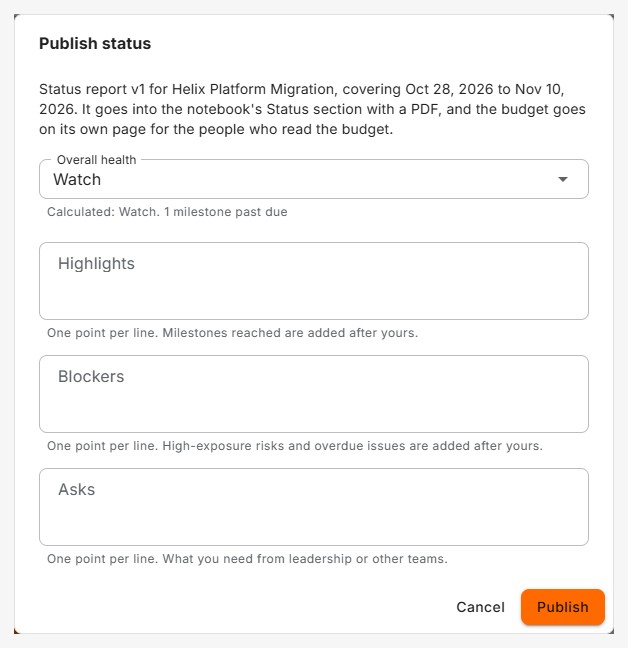
Friday's status, already gathered.
Publish status drafts the report for you: overall health is calculated, milestones reached join your highlights, and high-exposure risks and overdue issues join your blockers. It lands in the project notebook with a PDF, and health rolls up to the program.
- 06
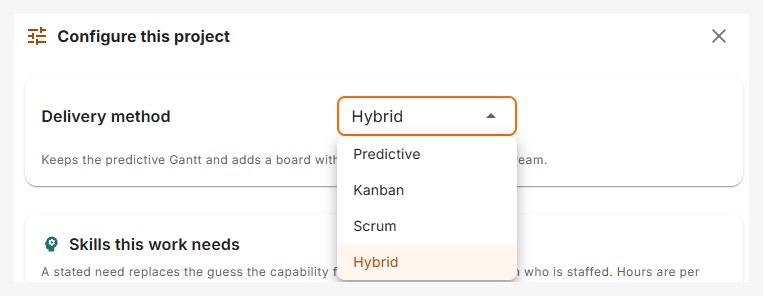
Your method, your call.
Run each project as Predictive, Kanban, Scrum or Hybrid, with backlogs, sprints and burndown on Pro. Bring schedules in from Microsoft Project, and keep your Outlook calendar in sync both ways.
At Hulu I rebuilt the same project plan three times a week, in three tools, for three audiences. In Nexus one project becomes a Gantt chart, a Kanban board or sprints, all in one place. That's the exact problem I used to solve by hand.
A real one
The SOW that never stopped growing.
I worked on a project where the project manager kept what he called a living SOW. Instead of an amendment for each change, the statement of work just grew. The whole team reviewed it at kickoff. Within weeks it was changing almost daily, with new work locations and new scope added as it went back and forth between the client and the team.
Deadlines slipped as the work grew underneath them. Before long nobody could say which copy was the active SOW and which was an old version. It was the worst scope creep I have ever seen.
Why project managers choose Nexus
Each one with the plan or suite it comes with. Mix seat levels in one workspace, so only the people who need a feature pay for it.
- Plans that keep up Automatic scheduling from durations and dependencies.Free
- Changes on the record Risk, issue and change registers, with approvals.Free
- A charter you never retype Section approvals and an assembled charter.Free
- Who does what, settled RACI on every task and project.Free
- A calendar that stays current Two-way Outlook sync and Microsoft Project import.Free
- Room before you assign Capacity and workload, with a notice when someone is overbooked.Basic
- The critical path in view Gantt, backlogs and sprints.Pro
- Try it before you commit Budgets and what-if scenarios.Pro
- Performance in plain words Baselines, earned value and resource leveling.Enterprise
- One SOW, every version Versions, amendments, staffing and rates on the contract.Contract Suite
- Run client projects? See Nexus for professional services
- Rather watch? Take the Nexus tour
- Comparing tools? See how Nexus compares
Bring the project that's slipping.
In 20 minutes I'll show you what it looks like in Nexus, and what moves first.